Author

Independent Publishing

Browsing

New to self-publishing? Then it’s important to tick all the legal boxes related to releasing your work, so you don’t run into trouble. It’s particularly worth noting for hybrid authors, whose traditional publishers have previously done all this work for them.

Listed below are some of the legal requirements for self-publishing in Australia, and a few tips to set you straight.

Copyright

Don’t get scammed: there is no ‘fee’ for retaining your copyright in Australia, and you don’t have to register—copyright protection is automatic upon creation of your manuscript.

But you do need to include a copyright page (or imprint page) in the front of your book to assert your copyright—this is also the first page checked by librarians, booksellers and distributors, so it’s pretty important. Your copyright page displays your copyright notice, ISBN, reservation of rights, and any Prepublication Data Service (formerly known as Cataloguing in Publication) or edition information. It’s also the place to attach any disclaimers, or contributor credits (such as acknowledgement of cover designers etc.). A short primer on the copyright page, and a template to create one, is available here.

Copyright lasts for the life of the author until 70 years after their death. You can find out more about copyright in Australia at the Arts Law Centre here.

For issues of copyright, the Copyright Agency Ltd (CAL) is a genuine non-profit organisation that protects author copyright, collects licence fees and distributes royalties. Membership is free, and you can claim payment for use of your work—particularly handy for authors who have books distributed in government or educational settings. You can join CAL here.

Cover image/font usage

You can’t just grab a cool image or font off the internet and stick it on your self-published book’s cover—a photographer or artist’s image, or a typographer’s font, is copyright protected. You can only use them by paying a licensing fee, or obtaining permission from the copyright holder.

If you’re creating your own book cover, or providing images to a cover designer, it’s up to you, as the publisher, to ensure those images are legally obtained and paid for, or are available through a royalty-free site (like Shutterstock).

Using quotes

In Australia, quoting a single line from another book may be considered a copyright infringement if the part you’re quoting ‘distils the essence of the work’.

If you’d like to use a quote in your book, even as an epigraph, you need to obtain permission from the copyright holder—the author and the publisher—and attribute the quote, and you might have to pay a licensing fee.

Some texts are considered ‘public domain’—works published in the US before 1923, for instance—but you need to check Australian law carefully before using any quotes.

Using song lyrics

Again, you have to obtain permission and pay a licensing fee. Song lyric permissions are notoriously expensive and hard to acquire—but if you know the musician or composer personally, you might get lucky.

Legal deposit

Every book published in Australia, or published by Australian authors or organisations, for free or for sale, must be deposited with the National Library of Australia (NLA) and the relevant State library.

Even if your book is printed overseas, if you’re an Aussie author, you’re obliged to deposit. One copy should go to the NLA, and one copy should go to the State/Territory library in which you reside. You are obliged to cover the cost of the books and postage yourself. If you’re working with a self-publishing service, it is you, not the service, who is responsible for deposit—but check with your service, so there’s no doubling-up. ISBNs are not a requirement for books to be eligible for deposit.

Ebooks: With improvements in digital technology and storage, the NLA is now requesting that self-publishers who only release in ebook deposit an electronic copy of their book via their new edeposit service.

Print: Find out where to deposit here. If you publish in both print and ebook, you only need to deposit one format.

Legal deposit isn’t really a chore: it’s a way to be confident that your work will always be accessible over time. Contact the NLA if you have any queries about legal deposit.

Still confused about legal requirements of self-publishing?

Contact the Arts Law Centre of Australia for a great info sheet covering most of the basic issues for self-publishers. They also offer legal advice to subscribers at radically reduced rates.
Ellie Marney is a teacher and hybrid YA author. She lives in Victoria with her family, and her latest book, White Night (Allen & Unwin), was published in March 2018. Find her at www.elliemarney.com or on Twitter or Instagram.

Does MyIdentifiers provide ‘e-ISBNs’ for ebooks?

There is a common misconception that there are ‘e-ISBNs’.  This is not the case.

Once you have purchased your ‘normal’ ISBNs from MyIdentifiers, you will have the option to allocate them to your ebook at the Title Registration stage.

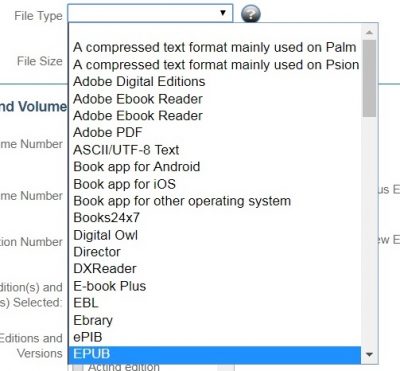
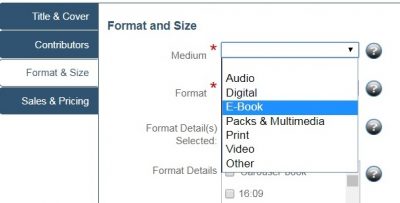
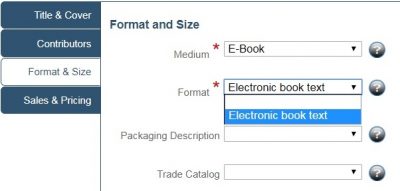
When you are reporting title detail to us at the ISBN Dashboards Format & Size page you should choose Medium: E-Book, Format: Electronic book text and you can choose to add File Type eg PDF, ePUB etc.


It is recommended that if you are producing both ePUB and mobi/Kindle file types, an ISBN should be assigned for each ebook format. They can then be listed together, along with the print publication’s ISBN if you have one, on the imprint page of the publication.

An example follows:

978 0 1234568 0 0 (pbk)
978 0 1234568 1 1 (ePUB)
978 0 1234568 2 2 (mobi)

While there is a lot you can do with Microsoft Word, it was never created to be a page-layout program. It was meant to be a word-processing program—something you can use to create letters, proposals and the like. Word is not a graphic design application. Good graphic design is a subtle art that considers many skills like typography, the use of white space, image selection, alignment and the creation of tone and texture. Graphic designers are skilled in using the applications required for computer generated graphic design. These applications include InDesign and/or Quark Xpress for desktop publishing. Photoshop is the industry standard for image manipulation, while Illustrator is the favoured application for drawing images.

Here are some reasons to reconsider using Word to design your print book:

1. You cannot easily control the canvas size because Word margins adjust according to the computer’s default printer settings.

2. You cannot easily control a font’s kerning (the space between letters) or kerning for individual sets of letters in Word. Also, if a Word document is opened on a computer without the fonts installed then Word changes the font to one that the computer does have installed.

3. You cannot control, with precision, the ‘leading’ (pronounced ledding) which is the typographer’s word for line-spacing. Yes, you can control it up to a point with single or double line-spacing, however, convention suggests a leading value of 50%—that’s 50% larger than (or 1.5 times the size of) your chosen typeface. In other words, if you’re using 12-point type, start with 18-point leading. Word does not give you this much control.

4. You cannot explore the fundamentals of book design. Take ‘optical margins’ as an example. This is just one thing you won’t get your word processor to do, but with a dedicated typesetting program like Adobe InDesign, you can improve the look of your book design with a simple feature. The hanging punctuation makes the edges of the text look straighter even when it’s not. Optical margins make for better book design.

5. Commercial printers will generally not accept Word files because they cannot control the output. However, some will build it into the print cost and create PDFs to print from. Digital printers such as Lightning Source and IngramSpark will not accept word files, only PDF layouts. (You can make ‘press-quality PDFs’ from Word, but you have a built-black problem as explained in #7 below).

6. Word cannot handle EPS (Encapsulated PostScript) graphic files well. Yes, you can insert all kinds of images into Word, but it is difficult to lock an image in place on a page and control the way that text flows round it. Essentially, it’s difficult and time-consuming to get graphics to ‘stay put’ on a page, wrap text around them, and control them. Graphics tend to ‘fly off’ to other pages, even when you take steps to painstakingly anchor graphics correctly.

7. Graphics do not translate well from Word into the world of offset or digital printing, which typically requires a high-resolution CMYK (Cyan, Magenta, Yellow, Black) image. When an image is placed into Word, often it is automatically converted to an RGB (Red, Green, Blue) image which is not advisable for digital printing nor offset printing. Sometimes these graphics may get converted back to CMYK for a ‘press-quality PDF’ (PQ-PDF) by the printer. This sounds like a simple solution to the problem, but when you ‘preflight’ (the process of confirming that the digital files required for the printing process are all present, valid, correctly formatted, and of the desired type) the resulting PQ-PDF, you end up with built-blacks (not 100% black) for any text that was in the graphic. Text in a built-black is too small for offset presses to print and you’ll end up with yellow or magenta or cyan halos around the text.

8. Word doesn’t use the colour matching system known as PMS (Pantone Matching System). PMS is the system that printing companies use to print your project. This is a standard in the design and printing industry and ensures that your project colours will match the colours you choose. A Word program only uses RGB. So, you’ll pay a fortune at the prepress stage to get your film output correctly. That’s if they output it at all … you never know! Word files are difficult to colour separate, if at all, and colour photos will be less than satisfactory. Essentially, you’ll spend a lot of money to get a very inferior print run.

9. If you supply a manuscript created in Word to a printer, you may pay more to have your project produced. This is due to the extra time that must be spent to get your project to output correctly and be usable by the printer. Often this is built into the printing costs, so you may not know the amount that is added to the total. You may also encounter a lower quality project because it was created in Word. Printers are not book specialists so often they will redo your book (either set it up in InDesign, or create a PDF from your word document) and in the process, make some fundamental publishing errors. For example, page numbers may appear on blank pages.

10. Even though you can create columns in Word, typically, text does not flow well. This is most noticeable when your Word document, that you have carefully laid out and created your columns of text, is opened in someone else’s Word software—the text flow is totally out of whack! Images may have jumped from the second to the third column, your text may run off the page—often it will look like a dog’s breakfast. Word does not transfer safely between computers (or even to printers’ computers).

In short, you will spend too much time on layout/production using Word; spend too much money at prepress to get usable, correct print files; and shed too many tears when you see the final inferior product.

To avoid disappointment, it is best to use software that is intended for this type of work such as Adobe InDesign. Using a book designer who sets out in InDesign will guarantee the flow of your text as well as your image placement. The result will look professional, be received by the marketplace and end-users will view it as a quality product. Plus, you will save yourself money by doing it the right way from the beginning.

Still want to do it yourself?

While using professional graphic design software is always our recommended route for book publishing, there’s a shift now towards a mid-range type of software that attempts to combine the word processing functions with layout functions.

The most popular is Microsoft Publisher which is only suitable for flyers, business brochures and similar projects, with templates available to make creative jobs easier. Apple’s Pages is considered a hybrid and can be used either as a word processor or as a layout engine (depending on the type of document you create). This category is showing the most growth in recent years, with more programs coming onto the market.

Relatively new to the scene is HTML software; it allows you to work on your book in the cloud—which is great for digital (ebooks) but still needs to go some way towards creating outputs suitable for print on demand and offset printing. We believe automated page composition will be the new norm and the future of self-publishing, where authors can design, edit, process, publish and promote in the cloud.


This support article is a guide only. Please make your decisions based on your own due diligence and research. 

Julie-Ann Harper has 25 years of experience in publishing, business training, self-publishing workshops and presentations. She is a passionate advocate towards true self-publishing and helping authors to view publishing as a business. Pick-a-WooWoo Publishing is the only Australian company listed under IngramSpark’s Resource Experts page as an ‘IngramSpark Self-Publishing Friend’.


The publishing industry has gone through big changes in the last few years—and perhaps the biggest change has been the emergence of a new model of authorship.

What is a hybrid author?

A hybrid author is a writer who is published both traditionally and independently. Some of their work (books, articles, poetry, screen or stage works, critique) is released through traditional means, and some is self-published.

You’re allowed to do that?

Yes. It’s 2018—people (even literary awards) are starting to realise that self-published books have legitimacy, and writers are starting to realise that they may need to diversify if they want to sustain a professional career. The publishing industry is in a state of flux as Amazon alters the literary landscape, and as movements like #WeNeedDiverseBooks and industry surveys like the Romance Diversity Report interrogate who gets published and why.

But authors should watch out for non-compete clauses in their contracts with traditional publishers, to ensure that they have control over the worlds and characters they want to self-publish.

Are publishers okay with the hybrid model? Does it disadvantage an author to have a foot in both camps?

Most publishers are aware that an author needs to earn money from their published work, and that if you’re an already-signed emerging or midlist author, you may need to expand your range of options to keep writing. Hybrid authors are actively raising their profiles with each new book released and extending their audience with click-through links to buy their other works, so trade publishers should see this as win-win scenario.

Indie authors can learn a lot from working with traditional publishing editors and teams. There have been cases where self-published authors with a proven track record have gone on to get deals with traditional publishers, but indie authors querying trade publishers are encouraged to be honest about their sales numbers (for print, audio and ebook formats) and explain how their business is run.

Be aware of your brand, too. If you’re publishing literary fiction with a trade publisher and erotic suspense fiction independently, you will need to talk it over with your publisher who might prefer a single recognisable brand.  And honestly, your readers prefer a single recognisable brand, too! In this situation, a pseudonym might be a good solution. You’ll also need to discuss timing of releases, so you and your traditional publisher aren’t releasing simultaneously.

What do agents think?

This is an area that’s still ‘under review’ in Australia, so much of the advice comes from the US. Agents generally only earn money on contracts they’ve arranged for authors through traditional publishers, so it’s good to let your agent know if you’re planning to self-publish. But indie authors still need help with controlling, enforcing and selling their rights (local, world, media, etc.). Agents have a good perspective on the industry and what’s selling, so as US literary industry advocate Jane Friedman notes in her article ‘Literary Agents and the Hybrid Author’, there are advantages to having an agent if you’re a hybrid author.

Some agents work closely with their authors to smooth the self-publishing road (also called ‘assisted publishing’, ‘partnership publishing’ or ‘co-publishing’), lining up editors and designers, and helping with distribution or placement, and this is a model worth examining. But be wary if an agency asks for commission on work they haven’t had any part in publishing.

What’s the worst thing about being hybrid?

Greater responsibility can be a burden. You have to shoulder any additional financial risk on self-published titles, formulate a business plan and do all the back-end work, and without an agent, you’re the sole negotiator in trade publishing discussions. You have to be super-organised. You might find that wearing two hats—being both author and publisher—can be exhausting.

What’s the best thing?

The author has absolute control over the titles they release independently—from the words and the cover to the pricing—and this provides greater flexibility to promote both their indie and their traditionally published work. You aren’t exclusively at the mercy of publisher timelines—there’s nothing stopping you from publishing a book or novella in between trade releases, if you want to maintain career momentum and increase discoverability. If you’re judicious about your brand, you can jump between genres or categories, releasing stories that your trade publisher doesn’t want to take a chance on.

In a nutshell, you have true control over your career, more options to publish, and you don’t have all your eggs in one basket.

Hybrid authors: advice from the pros

‘Research is everything. Find great people (such as cover artists etc.) to work with, and stick with them.’Kylie Scott, New York Times bestselling author of Trust.

‘I cannot overstate the importance of having someone who will call you on your bull***t, be it your editor with your publisher or someone you have hired on a freelance basis. So invest in good people. Hold yourself to a high standard. And keep your options open, because you never know what’s around the corner in this industry.’Sarah Mayberry, USA Today bestselling author of Temporary.

Ellie Marney is a teacher and hybrid YA author. She lives in Victoria with her family, and her new book, White Night (Allen & Unwin), is out March 2018. Find her at www.elliemarney.com or on Twitter or Instagram.